Tuesday, February 16, 2021

Welcome and Spring Conferences


Welcome to Digital Literacy, virtual edition, and welcome back to those students who are with me again. We are now in our third week of Digital Literacy, and I am so excited to be working with your students.  It has been so cold outside, that I think we are all glad to have some interesting school work to complete!

A short introduction of our class...my name is Angela Flickinger-Pierce (the students call me Ms. Pierce), and this is my third year of teaching  Digital Literacy at the Deforest Area Middle School.  This year, your student will have Digital Literacy for 6 weeks and our class will end on March 8.   

We have already worked on a graphic design project using Canva and explored the Engineering Design Process with our Bristlebots.  Currently, we are working on Digital Citizenship, or learning how to be safe online and are creating presentations in Powtoon.  Coming up we will be working on:

-Coding, using Scratch

-A Food truck graphic design project


We will also work on our typing, reading, vocab,  and coding skills with our warm-ups. For those students who are working with me again, there are a few options for class work!  I have switched up the class with those students in mind, and there are new opportunities for both our warm-ups with Gimkit and EverFi, as well as alternative projects that have been assigned for your students. Additionally, there are extensions available from all the Encore classes found in the Encore Extension Google Classroom that your student has access to at any time. It includes self-guided projects, games, art projects and more. 

     SPRING CONFERENCES are coming up!  If you have specific questions about our class, your student’s work, or anything else, please reach out to schedule a conference.  I will be available: Wednesday, February 24 from 3:45-4:45 pm and 6:15-8:15pm, Thursday February 25 from
8-10am, and Monday March 1 from 3:45-6:45pm. Feel free to contact me at  aflickingerpierce@deforestschools.org to schedule a time, and I will send you a link to meet!

Friday, October 2, 2020

It's been a busy first month of Digital Literacy!

Your students have been working SO hard this past month!  I can hardly believe that we are into the first few days of October already. It seems as though we just started our time together in class.  This past month, we have been focusing on our technology skills in many different ways. 

We have already explored graphic design by using a program called Canva. The students created posters for their own fictional bands as if they were rock stars.  I saw so many great posters-if you didn't get a chance to see your student's work, ask them to share!  

After our graphic design project, we explored how to be safe, responsible and respectful digital citizens.  This year, we focused on creating and keeping safe passwords.  With virtual learning, students are using more and more online media, and keeping information shared with online learning resources safe with a password is incredibly important!

Once we completed our safety unit, we moved on to coding in Scratch.  Scratch is a program created by the MIT (Massachusetts Institute of Technology) Media lab and allows users to create computer games with coding. We worked together on a Snake Game, and students created their own Snake sprite, and added code to their sprite for movement. It was amazing to see all the codes that students came up with, and many added backgrounds, sounds, and other movements well beyond what we learned in class!  Scratch is a great program to use on Wednesdays for extra practice with critical thinking, problem solving, and creativity.  If you are interested, there is a great book on Scratch call Coding Games in Scratch, a Step-by-Step visual guide to building your own computer games by Jon Woodcock.  I found a used copy on Amazon for just $1.50, but it can also be found at most libraries. 

This week, we started working on our understanding of the Design Process by creating a Food Truck.  A great overview of the design process can be found here. The students are creating a concept, theme, logo, menu, advertisement, and food truck wrap and putting all of their elements into a presentation that will be shared on Tuesday of next week. I have really enjoyed seeing their work-ask your student about their truck and see what they are creating!

Finally, this week your student had a brown paper bag in their take home totel In this bag, there are parts to a mystery project that the students will build next week Thursday. Please let me know if you were not able to pick up your tote. We will work to make sure that your student has their supplies. The items in their brown bag are the students to keep, there is no need to return them! 

I said finally earlier, but I have ONE MORE announcement. If your student is interested in joining the after school robotics club, watch for the announcement that will be sent out next week. I will be checking out kits, and we will be building a VexIQ challenge robot design so that we can possibly compete with a middle school team later this spring. The dates for the competitions are still tentative because of Covid, but we will be practicing each week with different designs regardless. The information meeting will be held on October 15 from 3:45-4:30.  If you are not able to attend the meeting, you are welcome to email me at aflickingerpierce@deforestschools.org and I can share the information with you!

Thank you for sharing your students with me-I know that virtual learning can be hard, but I have been so impressed with your students every day. They are truly a joy!

Wednesday, August 26, 2020

A new beginning to a new kind of school year

Welcome to Digital Literacy and the 2020-2021 school year!  There is so much information that is coming at parents right now, so I will keep my greeting as short and to the point as I can, and continue to answer all those great questions that you have as they come up.

First, my name is Angela Flickinger-Pierce, or Ms. Pierce, and this is my third year teaching Digital Literacy at DAMS.  Many of your students know me already, as I teach both the 5th and 6th grade sections of Digital Literacy, and I had most of your students last year!

As 6th graders, your student will explore many different types of technology including robotics, the engineering design process, graphic design, coding and online safety and digital citizenship. With the virtual start to the school year, our Google Classroom will look just like the Google classroom of their homeroom teacher, and we will share information in a similar way. Additionally, to help your student stay organized this year with Virtual Learning, I will be posting a "Week at a Glance" document on the stream that will show exactly what the students will be doing each day for the week. The rotations of Encore this year are 5 weeks long.  The "Week at a Glance" will include all of the links that students will need for the week. Assignments will all have due dates and be found under the weekly topics.  Your student will get a project grade each week for a total of 5 grades for the rotation. Grades are based on showing understanding of the ISTE standards, and are 4,3,2,1, with 4 being advanced and 1 showing that the student has not yet showed their understanding of the concept. Students with a 1 or 2 will be greatly encouraged to continue to work towards a 3, and extra one-on- one help is ALWAYS available. Just let me know. 

Details about the start of the school year can be found in this Encore Newsletter.  It gives details about the start of the school year, a video introducing all of the Encore teachers, a form for the "Family Connection Days" on September 1 and 2, and has contact and office hour information for all of the Encore teachers.  Please let me know if you have any information about the newsletter. 

Finally, I will use this blog to share information throughout the rotation.  You can look back on prior posts to see resources for a number of different activity ideas, staying safe online, and past student projects.

Welcome, back, everyone!  I know that this is a different start to the school year, but we are going to make this work and learn, and I am here to help you every step of the way!  I will leave you with pictures of my children from this summer. We spent most of our time outside, or gardening and baking.  My daughter Rachel is a senior this year and applying to study Marine Science at the University of Hawaii at Hilo, and my son Henry is 5 and will be attending 4K this year. 


Thursday, July 30, 2020

Websites, websites, websites! Information for families about privacy for students

This summer, I have been spending a lot of time reflecting on the work that we did as a school and community with Virtual Learning. I have been working on a class this summer to support my work as a teacher of technology called the ISTE Certification Class.  One of the issues that gave me pause is surrounding Digital Citizenship and the resources we are using online.  As we watch out students navigate an online world, it is often important to think about privacy and the type of information that websites, including educational websites, are gathering about its users. As part of my class, I did research on three different common educational websites that we use, and the information that the websites collect. I wanted to share my research with everyone this week, just in case you need a break from the summer sun and want to explore some new resources! 

Interland: Interland, according to its creators "is an adventure-packed online game that makes learning about digital safety and citizenship interactive and fun. Here, kids will help their fellow Internauts combat badly behaved hackers, phishers, oversharers, and bullies by practicing the skills they need to be good digital citizens." It is a game that has been played in many classrooms, including Digital Literacy!  Interland's privacy document includes a great tutorial about Cookies (A cookie is a small piece of text sent to your browser by a website you visit) if you are interested in learning more. From their tutorial on how they are collecting data, I delved into what is actually being collected when you log on.  As students play, there is less information collected than on other sites I found. Common Sense Media, which is an excelllent resource for parents looking to find more information about privacy rating for websites, has not yet rated Interland, but the parent users have given it a 5 star rating based on what they know about the Cookies from the site.  Google's privacy document on Interland says that they collect "information to help students maintain their levels in the game, age and demographic information, and information that might help identify additional educational opportunities for students interested in playing Interland." The last part of their privacy policy gave me pause, though one can expect that a free game with such good content would be used for marketing other apps and games by collecting information.  My vote: Interland is a safe game, and collects a minimum amount of personal data from your child. 

Exploratorium: Exploratorium is an actual museum in California, but it just happens to have a website that goes into all sorts of interesting science-related topics, and is a great resource for kids who want to explore some experiments on their own.  Exploratorium is rated 4 Star for privacy by Common Sense Media, and I did a bit of exploring on my own to make sense of the information they are collecting.  In their privacy policy, this site says that it "is collecting data on what pages are used, where you explore, and how long you stay on certain topics."  For me, this is information that I can understand that an organization would want.  What students are most interested in and where they are spending the most time helps form what new content will be updated.  As a teacher and a parent, this is helpful to know.  In this sites privacy policy it collects more personal information such as email addresses, mailing addresses, age, demographics, and other identifiers ONLY if your student wants to access parts of the site that require you to put in your information.  As a choice-based submission, this site's privacy policy is great for kids.  Talk with your student about adding information online about themselves, and consider coming up with a family policy about when they should ask before adding addresses, age, birthday or other identifying information.  Check out this site, however!  There are great activities for students of all ages, and things you can explore as a family. 

So I leave you this summer with these things to think about as your students spends time online.  I know that I rarely actually read the long, fine print in Privacy policies, but hopefully this information that I shared with you today might make you curious enough to take a peek.  The following questions I borrowed from Common Sense Media as a way of evaluating the websites that your students are looking at: 
1. Does it collect person information, and is that information then protected with a password?
2. Does the site tell you when it is collecting this information? 
3. Does that data stay with the website, or can it be shared with marketing (third-party)? 4. Does it collect your location?
5. Is the website collecting information from children under 13?

While you may not always think about your privacy, it doesn't hurt to check out what is happening!  As always, shoot me an email with any questions that you may have about this information, and hopefully you are enjoying the last bit of summer with your students!


Sunday, April 26, 2020

A funny way to start a week

Last week, I challenged my wonderful 6th grade students to do their best to make me laugh!  

I have included a few of my favorites below, but more will come out in weeks to come.  

I just heard about a restaurant called Karma. There is no menu.  You get what you deserve...

 image.png

When do astronauts eat???  At launch-time!

So my friends said "what rhymes with orange..." I said..."No it doesn't..."

How do trees get into a Chromebook?  They log on...

A thief broke into my house last night and started searching for money, so I woke up and started searching with him...

Beyond jokes, everyone has been doing fantastic work on their Digital Timeline projects. We will continue to work on our timelines this week and next.  Grades for Empowered Learner will be posted this week, based on everyone's hard work on their Food Truck projects.   An empowered learner is one that can take an active role in their learning, use technology and make choices to show what they know and what they can create.  A behavior grade for this project will also be posted. Remember these grades serve as a check-in, but will be entered as no-count.  These grades cannot bring down anyone's great Digital Literacy grade, but can be counted to bring up a grade.  An added note: I will be reaching out to a few students this week to ask permission to share some great examples on this blog and with the Norski Network team. If you receive and email from me, please respond before Wednesday of this week.  Your work will need to be sent to Ms. Clarke for inclusion by then. 

I miss all of my students so much!  It probably goes without saying, but it is my students that make me a teacher.  While I see everyone during our office hours, and I have been talking with everyone through email, I still very much miss seeing everyone's smiling faces and hearing your ideas in person.  Stay strong and safe!

Friday, March 27, 2020

We survived our first week!

Phew!  We made it through our first week of Virtual Learning!  I have seen such amazing work being done on your food trucks already. For those of you who have had a chance to join me during my office hours, thank you!  It helps to see everyone, and hear about the things that you have been working on.

I have a couple of important things to share with you today;

1. As a follow-up to Mr. Becker's announcement, we WILL NOT be switching classes when the quarter ends.  You will be staying part of Digital Literacy until we return to in-person school.  You may have questions about this, and I am happy to answer all of them!

2. You will have the entire week after spring break to work on your food truck.  If you happen to finish before, you will only need to work on your daily warm-ups for Digital Literacy.

3. After our Food Truck project is finished, we will start a Digital Days Documentary project which I will explain when we return from break. 

Thank you to everyone!  You have taken a new situation, and made it work.  Have a great break.  I hope that you can enjoy some time outside.  Let's all hope for nicer weather!!!

Monday, March 23, 2020

Happy first day of Virtual Learning!

Good morning and happy first day of Virtual Learning!

I hope that everyone is feeling good about the work that they will be doing this week.  I have had a few common questions that came up over the weekend that I wanted to address today.  The first, can we work in groups on our Food Truck projects?  The answer is, yes, absolutely!  The Food Truck Project was originally meant to be a group project, one in which we practiced our best Global Collaboration skills. If you would like to, and feel comfortable with the technology, reach out to a classmate using Google Hangouts, share your template with each other and find a way to collaborate. You can also work alone if you would like. 

The second question is when the quarter ends.  I have had several questions about this, and the last day of our quarter is April 7, the Tuesday after our scheduled Spring Break.  On Monday of that week, I will be sending you the Google Classroom codes to join your next class, and on Wednesday, you will start that class for the 4th Quarter.  There will be more information on this later.

As some of you remember, I have three chihuahuas.  My favorite is George, and I have started to make memes using funny pictures of him.  Below is the first of many!  

Monday, March 16, 2020

Virtual Learning and our Joke of the week

I know as a teacher and a mom, much of my time lately has been spent worrying about the many changes that we are facing as a community, school and country.  As your student's Digital Literacy teacher, my job is to make the virtual learning that we will be doing as stress free as possible. I will be posting answers to common questions here on my blog, but also  know that I am available for questions during my posted office hours of 9-10 am daily in 
Google Meet and by email throughout the day.  

My office hours are pre-scheduled, and your student will be able to follow the link that I will share in Google Classroom to access me during my office hours each day. Additionally, all of the classroom work that I will be sharing will be through Google Classroom.  Your student has been using Google Classroom for my class since the beginning of the quarter, and will be using the same classroom for virtual learning.  

On Thursday, I will be introducing our final project for Digital Literacy.  The last day of the quarter is two days after our scheduled Spring Break.  The students were working with different types of Coding last week, but because of equipment that we were using that we no longer have access to,  we will be ending our Coding unit and grades will be based on the wonderful work that your students have already done on their final projects. 

The final project for Digital Literacy is a Food Truck project. Students will be using the Design Process to plan and create a Food Truck concept.  The slideshow that I have shared includes videos and examples.  It may take several days to work through the entire slideshow.  I encourage you to think together on the concept, logo and menu items for your student's food truck!  Sharing ideas together will make the project more fun.  

Again, please let me know if you have any questions about anything-I am here to support you and your student throughout this entire process. 

I always post a joke of the week in my classroom, so instead of having our joke on our whiteboard, I will be posting our jokes here!  This week's joke:

Why is March the most popular month to use a trampoline?
Answer: It’s spring-time!


I said I posted jokes, I didn't say they were funny...stay safe and be well!


Tuesday, February 4, 2020

Off to a great start...

We are starting in on our second week of Digital Literacy, and we are already off to a great start.  The students have been exploring graphic design in Canva, while creating a poster that shares a few things about who they are.  Canva is an online graphic design program that the students will be able to use throughout the quarter, and is also a great resource for other classes!  There are many different templates and graphics to use in Canva that go well beyond what you can do in Google Slides or Docs.

Thank you to everyone that sent donations for our class!  We all appreciate having the pencils, Legos, ziplock bags and containers.  It helps us keep our classroom running smoothly. 

I just wanted to share a reminder about Teacher's Conferences that are coming up towards the end of this month. I will be available from 3:30-7:30 in my room on both nights on February 25-26 for conferences.  Because I teach both 5th and 6th grade students, there can sometimes be a line to chat.  If you would like a particular time for conferences, please let me know in advance and I can make sure to block off that time.  I will be sending out an email to you later this week with options for conferences.

As always, please reach out with any questions that you may have!

Tuesday, January 28, 2020

Is it really true that it is the third quarter already???? How did that happen!

I sent a letter home with your students yesterday, but I wanted to post this information here again for you. I will use this blog to share interesting things we are doing in class, pictures, and fantastic student work. 

For those of you who did know me from Digital Literacy last year, let me share a little bit about myself. My name is Angela Flickinger-Pierce, and this is my second year of teaching at the Deforest Area Middle School.  I love it here!  I love the students, the other teachers, the community, the parents,  I just love everything about being here!  Before I was a teacher, I worked as a Marketing and Fund Development Director for non-profits in the Madison area.  I realized my true passion was working with children, and I went back to school to become a teacher.  I was certified in 2018, and just completed my Masters of Education this past May.  I live in Poynette with my husband, daughter, son, chihuahuas and chickens. My human family (minus chickens and chihuahuas) can be seen below!


This year, Digital Literacy is going to be a little bit different.  Instead of having class every other day like last year, we will be meeting everyday for a quarter.  For 6th Grade, we will explore;
-Digital Citizenship, or learning how to be safe online
-Coding, using different programs
-Robotics
-Graphic Design 
-Engineering Design Process 

We will also work on everyday skills such as vocabulary, typing, collaboration, reading comprehension, and becoming learners that problem-solve, think creatively and know how independently attack whatever work we are doing. Digital Literacy is a Standards Based class, meaning that the grades earned in this class show what we are able to do according to a standard or skill.  The standards used for grading in this class are the ISTE Standards, or International Society for Technology Education linked here. We will start our quarter by breaking apart these standards, and thinking about what each of these standards means.  Every project completed by your student will include a rubric outlining the ISTE standards that they will be graded on.  You may have questions about these standards-please feel free to ask!  


I will be sending a parent letter home with your students on the first day of class with some other basic information about homework, missing assignments, one-on-one mentoring or tutoring time, and grades.  Additionally, I will be sending home a document with a Digital Literacy Wish List and Volunteer form.  I welcome anyone willing to give their time, from ten minutes to hours!  If you are at all interested in getting involved in the classroom, please fill out the form.  I have linked the form here as well. 

Finally, as we start out this new and fresh school year, I just want to say that your student's hopes, dreams, happiness, comfort and sense of self is my first priority.  If there is anything that you would like me to know about your student, please reach out!  I am here before and after school and can be reached by email and phone. It's going to be a great year!

Tuesday, November 5, 2019

The end of the quarter...

It is hard to believe that our quarter is ending so soon!  My superstar 6th grade classes have worked so hard since the beginning of the school year.   From coding to food trucks, we have been through so many different technologies over the past 10 weeks!

We started out the quarter learning about Canva, a graphic design program that you can use to create fun and innovative designs.  While learning about Digital Citizenship, we learned about Prezi and Powtoons.  While coding, we learned about the Circuit Playground Express, an external circuit that has lights, sounds and so much more!  We used Makecode to create a code for Harry Potter's Sorting Hat, Digital Literacy style.  We also learned how to code using MIT App Inventor.  As a group, we struggled with this technology, and learned that sometimes troubleshooting a technology can be very frustrating!  We also completed some very fun coding projects in Code.org.  

Our quarter is ending on a Food Truck Design Challenge.  In groups, we are working on completing the concept of a Food Truck. The students are currently working in groups to create a concept, logo, truck design wrap, menu, slogan and presentation.  We learned a new vector-based software called Vectr.  Vectr allowed the students to create logos.  We also learned about a great resource for finding colorful and interesting templates for Google Slides called Slides Carnival.   All of these software programs are accessible to students here at school, and may help your student create some really impressive projects in classes throughout middle school!

Finally, encourage your students to keep exploring technology and working on those great fundamental skills we have been practicing all quarter.  Typing Club, Newsela and Readworks, Quizlet and Code.org are all available to your student through their Google Classroom and Clever, and they can certainly keep practicing!  Thank you for sharing your students with me!  If any of your students are interested in continuing to explore technology, you are welcome to check out the after school clubs.  I will be running a Robotics club for four sessions. The first one starts this evening, but there will be opportunities to join in January, March and May. Please feel free to email or call to get more information!

Friday, September 20, 2019

An exciting few weeks in Digital Literacy!

The past three weeks have just flown by, and we have already accomplished so many things in 6th grade!

First, the students showed a little bit about themselves while learning a new program called Canva. Canva is a graphic design software that can be used online and includes templates, images, different fonts and layout ideas.  It is a great program that students can use when creating projects for other classes throughout middle school and even into high school.  Each student had to create a poster about themselves adding images, text, and even small animations that told the story of who they are and what they like.  I learned so much about all of them as they shared their work with me.  Everyone did a fantastic job!  Take some time to ask your student about their poster, and look at the wonderful graphic design work they completed while becoming Empowered Learners (one of our ISTE standards.  The link is included here if you would like to review) and exploring a new technology.

Last week, the students again were able to become Empowered Learners by working in a program called PowToons to create an engaging slideshow about the 7 Habits for Highly Successful people.  The students have been learning about the 7 Habits in their Norski and Advisory times.  If you are not familiar with the habits, I have included a link to a resource here.  We talked as a class how to use different resources and tools to learn new skills, and we used our best perseverance skills to trouble-shoot and collaborate.  It was a hard task for the students, and there were many opportunities to learn how to ask a good question when they were stuck!  Next week, I will be posting some great examples that the students created!

Finally, this week we started work on our Digital Citizenship projects.  The students will be learning yet another presentation software that they will be able to use in other classes called Prezi this week.  We will be working more on the instructions for Prezi, because it needs a lot more explanations.  This platform will be used to show what the students are learning about being Safe, Respectful, and Responsible online.

As always, I am happy to answer any questions that you might have!  Feel free to email, call or stop by.  I am still looking for more parent volunteers as well.  If you have the time, I would love to include you in our classroom!


Tuesday, August 27, 2019

Welcome to 6th Grade Digital Literacy!

I can hardly believe that the beginning of the 2019-20 school year is just around the corner! It seems as though I just said goodbye to all of my wonderful 5th graders and now suddenly they are coming back to me as 6th graders!

For those of you who did not have me for Digital Literacy last year, let me share a little bit about myself. My name is Angela Flickinger-Pierce, and this is my second year of teaching at the Deforest Area Middle School.  I love it here!  I love the students, the other teachers, the community, the parents,  I just love everything about being here!  Before I was a teacher, I worked as a Marketing and Fund Development Director for non-profits in the Madison area.  I realized my true passion was working with children, and I went back to school to become a teacher.  I was certified in 2018, and just completed my Masters of Education this past May.  I live in Poynette with my husband, daughter, son, chihuahuas and chickens. My human family (minus chickens and chihuahuas) can be seen below!


This year, Digital Literacy is going to be a little bit different.  Instead of having class every other day like last year, we will be meeting everyday for a quarter.  For 6th Grade, we will explore;
-Digital Citizenship, or learning how to be safe online
-Coding, using different programs
-Robotics
-Graphic Design 
-Engineering Design Process 

We will also work on everyday skills such as vocabulary, typing, collaboration, reading comprehension, and becoming learners that problem-solve, think creatively and know how independently attack whatever work we are doing. Digital Literacy is a Standards Based class, meaning that the grades earned in this class show what we are able to do according to a standard or skill.  The standards used for grading in this class are the ISTE Standards, or International Society for Technology Education linked here. We will start our quarter by breaking apart these standards, and thinking about what each of these standards means.  Every project completed by your student will include a rubric outlining the ISTE standards that they will be graded on.  You may have questions about these standards-please feel free to ask!  
Image result for iste standards


I will be sending a parent letter home with your students on the first day of class with some other basic information about homework, missing assignments, one-on-one mentoring or tutoring time, and grades.  Additionally, I will be sending home a document with a Digital Literacy Wish List and Volunteer form.  I welcome anyone willing to give their time, from ten minutes to hours!  If you are at all interested in getting involved in the classroom, please fill out the form.  I have linked the form here as well. 

Finally, as we start out this new and fresh school year, I just want to say that your student's hopes, dreams, happiness, comfort and sense of self is my first priority.  If there is anything that you would like me to know about your student, please reach out!  I am here before and after school and can be reached by email and phone. It's going to be a great year!


Thursday, April 25, 2019

A visit from a Web Developer and a whole lotta apps!

It has been awhile since I have posted an update on our class.  When the weather turns warm, the days seem to race past!

Earlier this month, we had a visit from real web developers from Noble Applications.  I have included a link to their website here.  Steve and Brandon brought an interesting new app that they have been working on for knee surgery patients.  The kids were able to try out the sensors and see how their movement was recorded in the app.  Steve and Brandon also answered many of the questions that the students had about what an average day was, their favorite parts of their job, and what sort of education they had to have to be a developer.  We appreciate all the time and effort that Steve and Brandon gave us and hope they will join us again next year!

In class, we have been working on building apps in MIT App Inventor.  We have worked on creating small apps with tutorials such as a drawing app called Paint Pot, and some larger apps using some code that was given to us such as the Germ Guide app. We learned the different between the Designer View, which shows us the user interface (what it would look like on our phone) and the Blocks View, which shows us the code. It has been a tough project, but I am super proud and impressed with the hard work that all of my students have done!  They have struggled with some of the concepts, but are continuing to work and make progress!!!

With our day off added back in  due to the snow days this winter, we took a day off from coding to practice the Engineering Design Process by building bridges in class.  I had so much fun watching the students create, problem-solve and collaborate to build a bridge strong enough to hold a bucket of blocks.  I have included some of the pictures from that day as well. 

As always, please let me know what you have for questions!  As we work through some of these projects, you may hear your student voice some frustration about the process.  I have been reminding everyone that sometimes the most meaningful lessons we learn is when we fail, and that learning how to fail and try again, is the best lesson of all!


Thursday, March 14, 2019

March-ing on towards spring with Apps!

It has again been busy these past few weeks, and I realized that I had not posted an update on our 6th Grade Digital Literacy classes in more than a month!  While I am not sure how that much time passed, there are many things to share with everyone!

Now that we are past our Algorithm work, we have been exploring MIT App Inventor through tutorials that we have been working on in our flexible classroom groups.  If you are interested in looking at the platform that your students are working in, the link for MIT App Inventor is here.  The students have been very involved in creating an app that you can doodle with, an app that you can program to talk to you, and another simple game app that involves a ball bouncing around the screen.  

I think that your student will tell you that getting to this point has been challenging.  Between logging into two different sites at once, connecting tablets through a code, and downloading a companion app on our Chromebooks, there has been more than enough opportunities for trouble-shooting and problem-solving with technology!  I appreciate the patience that the students have showed, and how they have been working together to help each other out. 

This week, we will be starting to build a Germ Fighter app using our PLTW instructions.  The students will have parts of the app already built for them, and they will work together to create the rest of the app during class.  For this lesson, students will be able to work at their own pace to complete the project. If your student needs any additional help from me, I am more than happy to work out a time after school, during Norski Time, or even during lunch/recess to help.  Sometimes, a little one-on-one time can help make the projects go better during class.

As always, please feel free to reach out with any questions or concerns.  I am here to help in any way that I can!

Wednesday, February 6, 2019

An algorithm a day...

Happy February!  

We have come through our snow days, our extra day off on Monday, and are working on getting back into our routine in class (in between ski trips of course!)

This week, we started the PLTW App Creators course.  I sent out an email with details about this new unit.   In case you missed the email, for the second semester, we will be working on the Project Lead The Way App Creator course.  This course is designed for 6th-8th grade students to learn how to design, program, test, and possibly publish their own app that solves a problem.  The following link is the website for the curriculum, and shares information on PLTW and what it means to be a PLTW school. Project Lead The Way Gateway Programs

The App Creators course has been completely created by Project Lead The Way to be the entire curriculum for one quarter (one semester for us, since we only meet every other day).  This means that we will be working on this unit almost every day, but will have a warm up to practice their fundamental skills and vocabulary. Project Lead the Way courses are specifically designed to provide the student with challenging and engaging lessons and projects that require students to work together, problem solve, analyze, lead and create at their own pace.  It follows an instructional model called "Project Based Learning". Here, through collaboration, real world resources, guidance, and problem solving the students learn by doing and exploring. This is different than many of the traditional models of education in that the teacher functions as the facilitator of learning rather than the deliverer of content, while the students direct their own progress.  

This week, the students have been working on writing a linear algorithm for how we start to our warm-ups. We had a few laughs as the students tried to guide me to the white board to write. Without the correct directions, I ended up walking into students, the desks and even the wall at one point!

Our class is working up to the students created their own app, and all of these ideas and concepts help the students understand the building blocks. Some of the activities might be a little frustrating as they are designed to help the students learn on their own, and to discover their own way. I continually remind the students that the important part of this is the process, not the end result. So if you finish, fantastic! If you don't finish but continued working at it, also fantastic!

Please let me know if you have any questions. I love to have visitors! You are welcome to reach out to me by email or phone.

Friday, January 18, 2019

Coding, coding and MORE coding!

This week has flown by!  It has been a busy few days in 6th Grade Digital Literacy!

We started independent coding projects in Code.org this week.  Many of the students have enjoyed using their developing block coding skills to program games, dance parties, Minecraft worlds and more!  Overwhelmingly, the favorite was the dance party.  I have included links to a few of the more advanced dance party codes.  Not only did this coding project provide the opportunity for the students to choose a project that they were most interested in, it also created a great sense of classroom camaraderie!  Students were collaborating on bits of codes, pooling their collective knowledge and marveling at each others projects!  It has been a great week watching the students grow in their tech and coding skills, and I can't wait to see more. 

Next week, as the semester comes to a close, I will be meeting with each of my students to talk about their code.  We are going to look at what they found difficult, and what was easier in this project.  They will also use the rubric to tell me what they feel they deserve as a grade, and I will give them their final score.  

We also will be transitioning into our next unit, which will last us until the end of the year.  Together we will be learning about coding phone Apps using MIT App inventor.  This is a free program, and I am including the link here if you would like to check it out yourself.  With this program, we will be completing the App Inventor project through Project Lead the Way. 

I hope you can take a look at some of the Dance Party codes below.  They are very impressive!  Take a look at the coding by pressing the "How it Works" button, and peek at what is behind these animations, and see if you can figure out how to interact with the Dance Party! 

Dance Party Student Example 

Dance Party Student Example Two

Dance Party Student Example Three

Tuesday, January 8, 2019

Spheros, Playgrounds and Cubelets, Oh, My!

It has been a wild few days back from our break exploring different robots and a fun coding explorations using a Circuit Playground which plugs directly into the Chromebooks and can be coded to do all sorts of fun things with lights and sounds.   If you haven't heard of a Circuit Playground, take a peek at the some of the projects that you can make with them below.  

Circuit Playground Projects 

For our exploration with the Circuit Playground, we had the challenge of trying to turn our Circuit Playground into Harry Potter's Sorting Hat!  Though it is a tricky bit of coding in Microsoft's Makecode program linked here, several of our students were able to complete the project, and were able to sort their classmates into the different Hogwart's houses!  

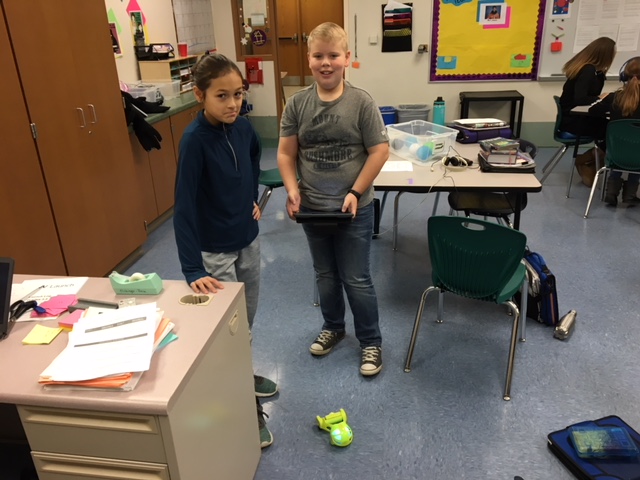
We also explored a few different types of robotics, learning about how to troubleshoot technology that we do not understand every step of the way.  One of the important aspects of this class is to find ways to use new technologies.  For this station, we looked at Ozobots, Cubelets, and the Spheros to try and figure out how to get them to work!  Many of the students had some frustrating moments when the Bluetooth did not work the way they wanted it too, or they didn't understand the direction cards they were given.  By working together, the students continued to work through their frustration, and were able to get the robots to do a few things!

This week, we will be looking at another new technology, virtual reality.  We will be exploring how it works, and taking turns experiencing it.  We also will be starting an independent coding project, which the students will be able to bring together all of the skills they have been learning about coding to create a project that is unique to them.  I hope to be able to share a few of these projects in a future post.